Bivoac: A Layered Display Font for Bold 3D Design
There’s a particular kind of design challenge that stops you in your tracks. You’re working on a logo, a poster, or a social media campaign, and you know the typography needs to do more than just sit there. It needs to have presence, depth, and a sense of crafted dimension. You could spend hours layering different fonts, adjusting shadows, and manually creating effects in your design software. Or, you could start with a tool built for that exact purpose. That’s where Bivoac comes in.
More Than Just Letters: Understanding Bivoac's Character
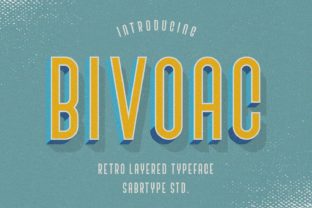
At its core, Bivoac is a premium display font, but that simple label doesn’t quite capture its utility. It’s a layered font system designed to give you immediate access to 3D effects. The typeface itself has a strong, geometric foundation with a slightly condensed, sturdy feel. It’s not a delicate serif font or a flowing script font; it’s a workhorse with architectural confidence. The real magic, however, lies in its construction.
The download includes five distinct styles. Think of these not as separate fonts, but as components of a single, versatile design asset. You have your base outline, a solid fill, a shadow layer, a highlight layer, and a texture or detail layer. By stacking these styles in your design application and assigning them different colors, you can instantly create a wide array of effects—from a clean, embossed look to a gritty, vintage stamp aesthetic. This approach fundamentally changes your workflow for projects requiring impactful headings.
Where Bivoac Truly Shines: Practical Applications
The value of a creative font like this is measured in its real-world application. Its strength is in scenarios where you need to grab attention quickly and communicate a sense of quality or fun through dimension.
- Logo Design & Brand Identity: For brands that want to project strength, modernity, or a hands-on craft quality, Bivoac is a compelling choice. Imagine a brewery logo with a layered, textured feel, or a tech startup’s wordmark with a clean, extruded 3D look. It helps build a brand identity that feels tangible and memorable right from the start.
- Editorial & Packaging Design: On a magazine cover or product packaging, a headline set in Bivoac can dominate the layout in the best way possible. It’s perfect for titles that need to pop off the page, whether it’s for a men’s lifestyle magazine, a coffee bag label, or a box for artisanal chocolates. The layered effect adds a tactile quality that flat text simply can’t achieve.
- Digital & Social Media Graphics: In the fast-scrolling world of social media, dimension is your friend. Using Bivoac for Instagram post headings, YouTube thumbnails, or website hero banners can significantly increase audience engagement. The 3D effect creates a focal point that stops thumbs and draws the eye, making your message harder to ignore.
- Event & Promotional Materials: Think concert posters, festival flyers, sale announcements, or wedding invitations with a modern edge. The font’s personality can be adjusted through color and layer combination to feel edgy, festive, or elegant, making it a versatile tool for any designer or small business owner creating their own marketing materials.
Putting Bivoac to Work: A Designer’s Practical Guide
Adopting any new design asset requires a bit of strategy. Here’s how to approach Bivoac to ensure it enhances your work rather than complicates it.
Evaluating Fit and Ensuring Readability
First, consider the project’s voice. Bivoac’s personality is bold and assertive. It’s an excellent fit for projects targeting a 20-50 demographic that appreciates modern design with a bit of edge—think entrepreneurs, creatives, and style-conscious consumers. It might be less suitable for a law firm’s annual report or a medical brochure where a traditional sans serif font or serif conveys more stability and seriousness.
Next, think about readability. As a display font, Bivoac is designed for headlines and short bursts of text, not for body copy. Its layered nature, while visually striking, can become tiring to read in long paragraphs. Use it for titles, subheadings, pull quotes, and logos. For the supporting text, pair it with a clean, highly legible sans serif font or a neutral serif. This creates a clear visual hierarchy, guiding the reader’s eye exactly where you want it to go.
Mastering the Layers and Exploring Pairings
The key to using Bivoac effectively is experimentation with its five styles. Don’t just use the default stacked effect. Try using only two layers for a simpler look. Swap the colors of the shadow and highlight. Use a texture layer with a very low opacity to add subtle grain. This process is where you move from using a font to truly crafting with it.
When it comes to font pairing, simplicity is your ally. Because Bivoac carries so much visual weight, its partner should be understated. A geometric sans serif like Montserrat or a humanist sans serif like Open Sans works beautifully for body text. If you want a more editorial feel, a classic serif like Lora or Merriweather can provide a sophisticated contrast. The goal is balance—let Bivoac be the star of the show in the headlines, and let its partner handle the supporting narrative quietly and effectively.
Understanding the Commercial License
Before you use any commercial font in a project for a client or for sale, always review the licensing. Bivoac is typically sold with a license that permits use in commercial projects—logos, websites, printed materials, and merchandise you create for clients or for your own business. However, it’s crucial to read the specific terms provided with your purchase. This ensures you’re using the font legally and protects both you and your client. It’s a small step that speaks to professionalism and respect for the craft of type design.
In the end, Bivoac isn’t just another typeface to hoard in your font library. It’s a specialized tool for a specific job: adding dimension and impact. By understanding its personality, applying it in the right contexts, and pairing it thoughtfully, you can leverage this modern typography asset to create designs that feel both intentional and visually compelling. It’s about working smarter, not harder, to achieve that layered, professional look your projects deserve.